Online booking
Online patient booking that works around the clock
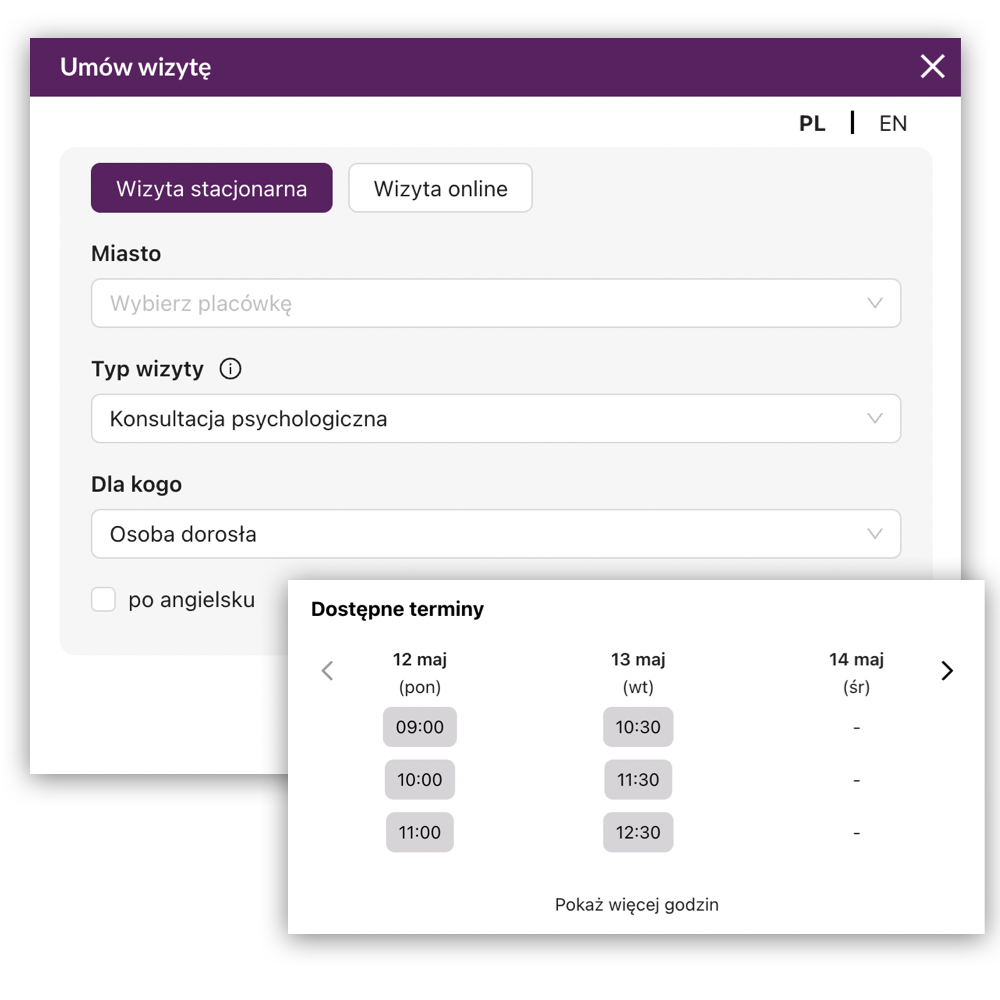
Let patients choose a service, specialist and available time on your website—without calling reception or creating an account.
The result
What changes in your daily work
MyMedCal turns the availability already configured by your team into a simple booking path for patients. The main widget can search across your offer, while a personal specialist widget or direct link can present a selected calendar.
- Fewer routine booking calls for reception
- A shorter path from website visit to confirmed appointment
- Current availability shown directly from the MyMedCal schedule
- A consistent booking experience on mobile and desktop
In practice
How it works
- 1
Patient chooses what they need
The widget can ask about location, service, appointment type and other criteria used to match the right specialist.
- 2
MyMedCal shows real availability
Only time slots compatible with the service, specialist and configured schedule are offered.
- 3
The appointment is confirmed
The patient enters contact details and receives the relevant confirmation and payment information.
A widget for one specialist
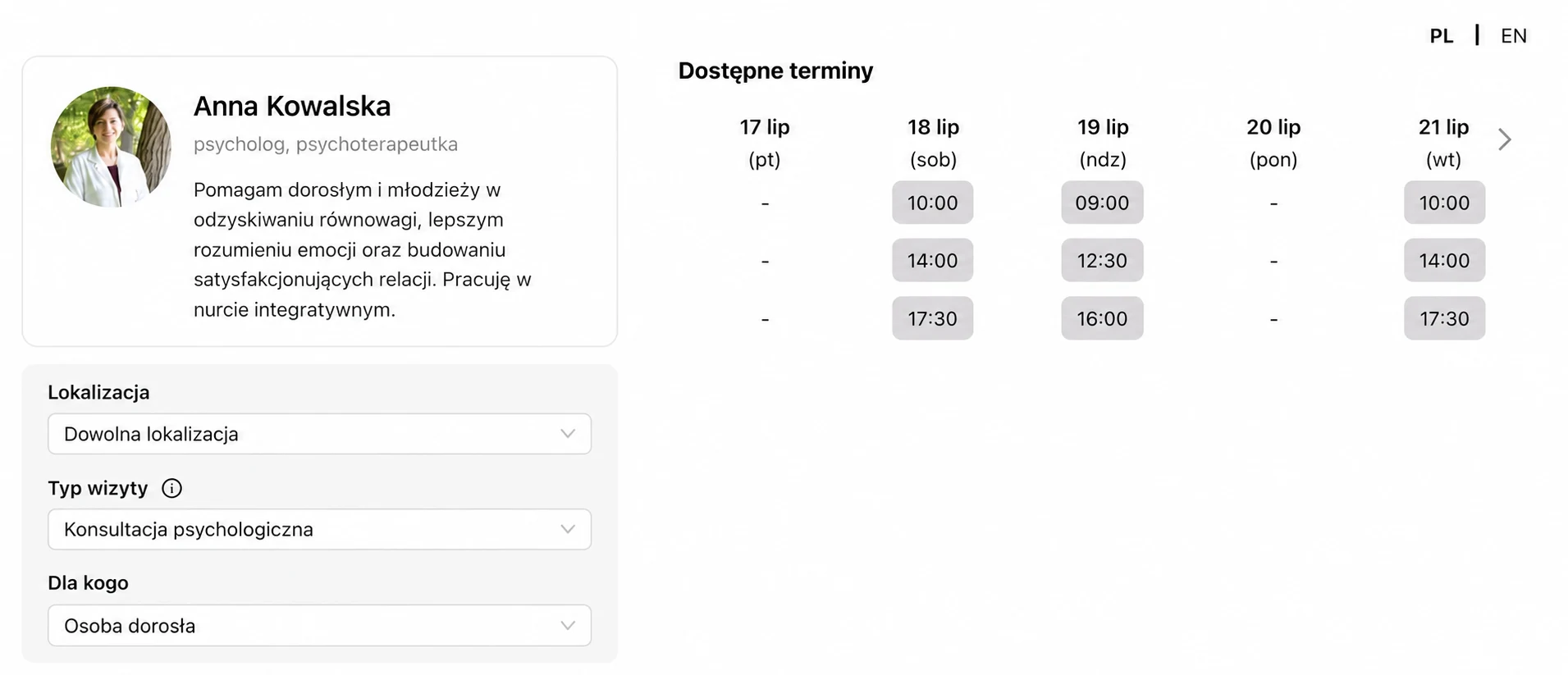
A personal specialist widget—an individual calendar on a website or in a link
Give each specialist a dedicated booking path. Patients see that person's profile and real availability immediately, without searching the facility's full offer first.
- Embed the personal widget directly on the specialist's website
- Send patients a direct booking link by email, message or social media
- Open the calendar with a specific service already selected
- Optionally narrow availability to a selected location
Capabilities
What you can do in MyMedCal
- Main booking widget for the facility website
- Personal specialist calendar as an iframe or direct link
- Installation on WordPress or another website using a short code snippet
- Opening the widget from your own booking button
- Optional service and location filters in personal calendars
- Google Tag events for key booking steps
- Polish and English booking interface
- Brand colours, logo and facility information
Free consultation
See how your facility could work
We'll review your reception, schedules, and patient bookings. We'll show you how to simplify day-to-day team organization and adapt MyMedCal to your facility's needs.
Who it helps
When this feature is especially useful
- A practice that wants to accept bookings outside reception hours
- A specialist sharing available dates in social media or an email footer
- A multi-location facility that needs to filter appointments by city
- A marketing team measuring the path from widget opening to booking
Keep exploring
Related MyMedCal features
Online calendar and schedules
Manage appointments, specialist availability, online work and room schedules in a shared MyMedCal calendar.
Learn more →SMS and email reminders
Automate appointment confirmations, reminders and operational messages by SMS and email, with a visible sending history.
Learn more →Online payments
Accept Tpay payments, connect transactions with appointments and automatically confirm paid bookings in MyMedCal.
Learn more →
Frequently asked questions
Do patients need to create an account?
No. A patient books by choosing an available time and providing the required contact details.
Can the widget be installed on WordPress?
Yes. The installation code can be added to the site footer, for example with a plugin that inserts custom HTML snippets.
Can the widget open from our own button?
Yes. Your existing “Book an appointment” button can open the main widget after the MyMedCal trigger class is added to it.
Can the widget show only one specialist?
Yes. A personal widget shows the selected specialist's profile and available times instead of asking the patient to search the facility's full offer.
Can I send a patient a direct booking link?
Yes. A specialist can share their personal booking link by email, message, social media or any other communication channel.
Can the link open with a specific service already selected?
Yes. The personal link can preselect a service and, optionally, a location so the patient immediately sees the relevant calendar and available times.
Does online booking work on phones?
Yes. The booking flow adapts to mobile and desktop screens, so patients can select a time from the device they already use.
Can we track booking activity in analytics?
Yes. When Google Tag is present, the main widget emits events for loading, opening, searching, reaching the form and completing the booking step.
Does the widget show occupied time slots?
No. It uses the current MyMedCal schedule and presents available time slots that match the selected booking criteria.
Can we adjust the widget to our brand?
Yes. The booking experience can include your facility's colours, logo and service information.